
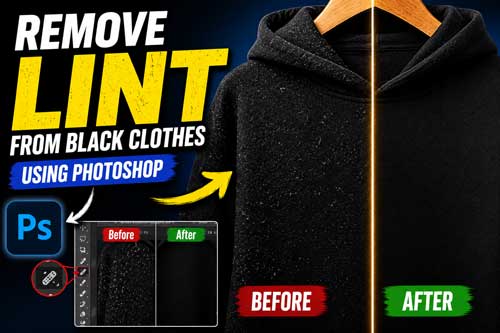
How to Remove Lint from Black Clothes for Product Photography
Black clothes can look sharp in person and messy on camera.
A tiny bit of lint, fuzz, or pet hair may seem minor. In a product photo, it can stand out fast. That is even more true on black shirts, sweaters, hoodies, and dresses.
If you sell apparel online, clean photos matter. Buyers notice fabric condition, texture, and finish. When dark garments look dusty or fuzzy, the product can feel lower quality.
This guide shows how to remove lint from black clothes before the shoot and after the shoot. You will also see when manual cleanup beats quick AI fixes, and when it makes sense to outsource the work.
Why Black Clothes Show Lint More Than Other Garments
Black fabric creates strong contrast. On white or light gray clothing, small fibers often blend in. On black garments, lint sits on top visually. It catches the eye right away, especially in close-up product shots.
That is why a black sweater can look fine during styling but rough in the final frame. Tiny dust spots, fuzz, and stray threads show more clearly because the background fabric is dark and even.
High-resolution product photography makes this worse. Modern cameras pick up surface detail that people miss in real life. Good for texture. Bad for lint.
This matters even more for ecommerce. Buyers zoom in. They compare products side by side. On Amazon, Shopify, Etsy, and eBay, small surface issues can make a clean item look poorly handled.
So the problem is not just lint itself. It is visibility. Dark apparel gives lint a spotlight.
What Causes Lint in Product Photography
Lint shows up long before retouching starts.
Some fabrics attract more surface debris than others. Knits, fleece, wool blends, velvet-like materials, and soft brushed fabrics tend to catch fuzz fast. Static also makes things worse.
Storage is another big factor. Clothes pulled from packaging, cartons, racks, or crowded sample bins often carry dust, loose fibers, or stray threads. Even a clean studio cannot fully fix messy garment handling.
Styling friction adds more trouble. When clothes are adjusted on a table, pinned, steamed, clipped, or layered, they rub against surfaces. That creates fresh fuzz and pulls loose fibers to the front.
Then the camera makes every problem bigger. Bright lighting and sharp files reveal lint that the human eye ignores. A garment may look fine from three feet away, then look dusty at 200 percent zoom.
Editors also know that black garments hide trouble in folds, seams, side panels, cuffs, underarms, plackets, and logo edges. Those areas are easy to miss during prep and easy to notice in the final image.
So when people ask about lint in product photography, the real answer is simple. It comes from fabric, storage, handling, static, and high-detail capture.
How to Remove Lint Before the Photo Shoot
Pre-shoot cleanup saves editing time. It also helps you protect fabric texture. The less junk you need to remove later, the more natural the final image will look.
Start with the right prep tools
Keep a basic garment prep kit near the set:
- lint roller
- soft garment brush
- low-tack tape for small spots
- garment steamer
- microfiber cloth
- clean gloves for handling dark items
A lint roller is usually the fastest fix. It works well for surface debris on black tees, hoodies, and flat-lay apparel. For delicate fabrics, a soft brush may be safer.
Tape can help in small areas, but use care. On textured fabric, it may lift fibers unevenly. That can make retouching harder later.
Steam before final cleanup
A quick steam helps more than people expect.
It relaxes wrinkles, reduces static, and makes lint easier to spot. It also helps the garment sit better on set, which reduces distracting folds and bunching.
Do not clean lint first and steam later. Steam often brings new fibers to the surface. Do the steam pass first, then do the final lint check.
Clean the styling area too
Many teams clean the garment and forget the table.
That causes repeat contamination. Dark clothes pick up debris from styling pads, tabletops, hangers, clips, and even sleeves from the person handling the item.
Use a clean surface before placing each garment. If you are working through volume, reset the station often.
Check under shoot lighting
Room light is not enough.
Before shooting, hold the black garment under your actual set lights. Rotate it a little. Lint often appears only when light skims across the fabric.
This quick check can prevent hours of avoidable retouching.
Use a simple pre-shoot routine
A strong prep order looks like this:
- steam the garment
- clean the styling surface
- remove visible lint
- inspect under set lights
- do a final close check before capture
That is still the best way to remove lint from clothes for product photography. Fix as much as possible before the file ever reaches editing.
How to Remove Lint from Black Clothes in Product Photos
Even with good prep, some lint stays.
That is where post-production matters. The goal is not just to delete visible debris. The goal is to clean the garment while keeping fabric texture real.
Zoom in, but do not edit blindly
Start with a full view. Then zoom in for detail work.
Many editors review black clothing at different zoom levels. A wider view helps catch overall balance. Close zoom helps catch small lint, stray fibers, and dust spots.
Working too close for too long can create uneven cleanup. The image may look perfect at 300 percent and fake at normal size.
Use the right cleanup tools
For most apparel files, editors rely on tools like:
- Healing brush
- Clone stamp
- Patch tool
- Spot cleanup for tiny debris
Each tool has a purpose. A healing brush works well for tiny lint marks on stable fabric areas. Clone stamp gives more control near seams, edges, logos, and detailed texture. Patch-style cleanup can help on broader messy zones when done carefully.
There is no single magic tool. The best choice depends on the fabric, lighting, and pattern.
Protect texture at all times
Black fabric needs cleanup, but it also needs life. If you smooth too hard, the garment starts to look plastic. If you clone carelessly, the weave repeats. If you erase near folds, the shape can look flat.
Professional product photo retouching means keeping the texture believable. That matters on cotton, knitwear, ribbed fabric, fleece, and premium fashion pieces.
Real editors often work around seams, cuffs, collars, plackets, and logo areas more slowly than the rest of the garment. Those spots break easily when rushed.
Clean edges and structure too
Lint is not always sitting in the middle of the fabric.
It also collects near sleeve edges, hems, side seams, underarm lines, and neckline transitions. On ghost mannequin or flat-lay images, edge cleanup matters just as much as surface cleanup.
If the product also needs shape work, editors may pair lint cleanup with Cut Out Image work or invisible mannequin production. That keeps the garment clean and presentation-ready in one pass.
Review the image like a buyer
After the cleanup, step back.
Look at the file at normal view, zoomed view, and listing thumbnail size. A good edit should feel clean, not edited. Buyers should notice the product, not the retouching.
This is the heart of how to remove lint from black clothes for product photography. Clean the distractions. Keep the garment real.
Manual vs AI Lint Removal
AI can help with speed.
It can spot obvious lint, reduce repetitive cleanup, and support batch workflows. For routine catalog jobs, that can save time.
But AI is not always texture-safe.
On dark fabric, AI tools often blur fine weave detail, smear knit patterns, or create soft patches where the surface should stay natural. It may also miss lint near seams, folds, badges, stitching, and logo edges.
That is why manual review still matters. A human editor can tell the difference between lint and true garment texture. They can also judge when a cleanup pass starts looking fake.
For premium apparel, close-up shots, hero images, and fashion detail frames, manual retouching is usually safer. It protects realism and keeps the garment consistent across the full set.
The best workflow is often hybrid. Use AI where it helps. Then finish with human QA.
That balance is important for ecommerce catalogs. Fast output matters, but clean and believable results matter more.
Common Mistakes That Ruin Black Clothing Photos
Most bad cleanup is not dramatic.
It is subtle. But buyers still feel it.
One common mistake is over-smoothing. Editors remove lint, then keep going until the fabric loses its real texture. The clothing starts to look waxy or flat.
Another mistake is inconsistent cleanup. One image in the set looks clean. The next still has fuzz on the sleeve. That hurts trust and makes the catalog feel uneven.
Missed lint around seams is another big one. Editors often clean the center of the garment and forget cuffs, hems, collars, side edges, and folded sections. Those missed spots stand out.
Logo edges also need care. Aggressive cleanup near branding can soften outlines or distort stitching. That makes the product look less premium.
Then there is fake cloning. Repeated texture patterns are easy to spot once you know what to look for. Fashion photographers and catalog teams notice it fast.
Strong apparel image cleanup should feel invisible. Cleaner image. Same garment. Same texture. No weird finish.
When to Outsource Lint Removal and Apparel Retouching
DIY cleanup works for small batches.
But once volume grows, the math changes.
If you are launching a catalog, updating seasonal variants, managing marketplace listings, or handling weekly studio output, lint cleanup can eat time fast. That is especially true when every image needs consistent standards.
Outsourcing makes sense when you need:
- Batch consistency across many SKUs
- Fast turnaround
- Reliable texture-safe cleanup
- A repeatable style guide
- Extra support during product launches
This is not just about saving labor. It is about protecting quality. A good retouching partner checks the whole garment, not just the obvious lint. They review seams, folds, logos, edges, and visual consistency across the full set.
For apparel brands, Amazon sellers, Shopify stores, Etsy shops, and studio teams, that can remove a lot of production stress.
It also helps when lint cleanup overlaps with other garment edits like ghost mannequin, shape correction, symmetry work, or a future Apparel Photo Editing workflow. In those cases, one clean pipeline is better than piecing tasks together.
Checklist Before Publishing Black Apparel Product Images
Before you publish, do one final check.
Use this quick list for black apparel files:
- Zoom in and scan for remaining lint
- Check cuffs, seams, hems, and collar edges
- Make sure texture still looks real
- Confirm shadows and tones match across variants
- Review logos and stitching for soft spots
- Compare front, back, and detail shots for consistency
- Test the image at thumbnail size and zoomed size
- Make sure the garment looks clean, not over-edited
This final QC step matters more on black products than most teams expect. A file that looks fine at first glance can still show fuzz in the marketplace zoom view.
Frequently Asked Questions
Can you remove lint from clothes in photos after the shoot?
Yes. Most lint can be cleaned in post-production. The best results come from careful manual retouching, especially on black garments and textured fabric.
How do you remove lint in Photoshop without ruining fabric texture?
Editors usually work with small, controlled cleanup passes. They use tools like healing brush and clone stamp, then review the fabric at different zoom levels. The key is preserving the original surface pattern.
What is the best way to remove lint from black clothes before product photography?
Start with steaming. Then use a lint roller or soft brush. After that, inspect the garment under your actual shoot lighting and do one final cleanup pass before capture.
Does AI work well for lint removal on black clothing?
Sometimes. AI can speed up basic cleanup, but it often struggles with texture, seams, folds, and close-up detail. Human review is still safer for premium apparel images.
Why does black clothing show more lint than light clothing?
Because contrast is stronger. Dust, fuzz, and stray fibers stand out more clearly on dark fabrics, especially in sharp product photos.
Can lint cleanup be combined with ghost mannequin editing?
Yes. It often should be. Apparel sets usually need multiple steps together, like lint cleanup, shape correction, background cleanup, and Invisible Mannequin work.
What parts of the garment are most often missed during cleanup?
Seams, cuffs, hems, plackets, underarm folds, collar edges, and logo areas. Those spots need slower review.
When should a seller outsource apparel retouching?
Outsource when volume increases, deadlines get tight, or consistency matters across large product sets. It is especially useful for catalog launches and marketplace image batches.
Can lint removal help conversion on ecommerce product pages?
Cleaner images help products look more polished and trustworthy. They also reduce visual distractions, which makes the garment easier to evaluate.
What other edits usually go with lint removal for apparel?
Common pairings include background removal, Cut Out Image, shape correction, Apparel Recreate Symmetry, wrinkle cleanup, and color correction.
Need Help Cleaning Black Apparel Images at Scale?
If your team handles black garments often, lint cleanup can become a bottleneck fast.
Edit Image Online helps apparel brands, ecommerce sellers, and studios clean black clothing photos without losing real fabric texture. Try our Free Trial with up to 5 images, or Contact Us for bulk apparel retouching support.